
Billing and Invoicing That Gets You Paid Faster

Billing shouldn’t be the worst part of your month. CaseFuze makes generating invoices, tracking payments, and getting paid straightforward instead of painful.

Generate Invoices in Minutes, Not Hours

Most attorneys dread billing because it takes forever. Review timesheets, calculate amounts, format invoices, apply trust funds, write off time, adjust rates. By the time you’re done, half a day is gone and you haven’t billed a single hour of client work.

CaseFuze generates invoices automatically from your tracked time and expenses. Select the date range, review the entries, and click generate. The system calculates totals, applies your billing rates, formats everything professionally, and produces a PDF ready to send.

You can still review and adjust before sending. Write down time that shouldn’t be billed. Discount amounts for client relations. Add manual entries for flat fees or retainers. But the initial generation happens in seconds, not hours.

Multiple Billing Methods

Not every case bills the same way. Personal injury works on contingency. Corporate clients pay hourly. Simple matters use flat fees. Some clients pay retainers that get drawn down as work happens.

CaseFuze handles all of these:

  • Hourly billing: Track time, apply rates, generate invoices based on hours worked
  • Flat fees: Set a fixed price, track payments, and mark matters complete when paid
  • Contingency fees: Calculate percentages of settlements or judgments automatically
  • Retainer billing: Draw down from trust funds as work is performed
  • Hybrid arrangements: Combine methods for complex billing structures


Switch between billing methods on different cases. Set default rates per attorney or practice area. Apply different rates for different work types (court appearances, research, client meetings).

How CaseFuze Simplifies Legal Billing

Billing, trust, and collections organized in one place.

Track work, create invoices, collect payments, and see what still needs attention without bouncing between disconnected tools.
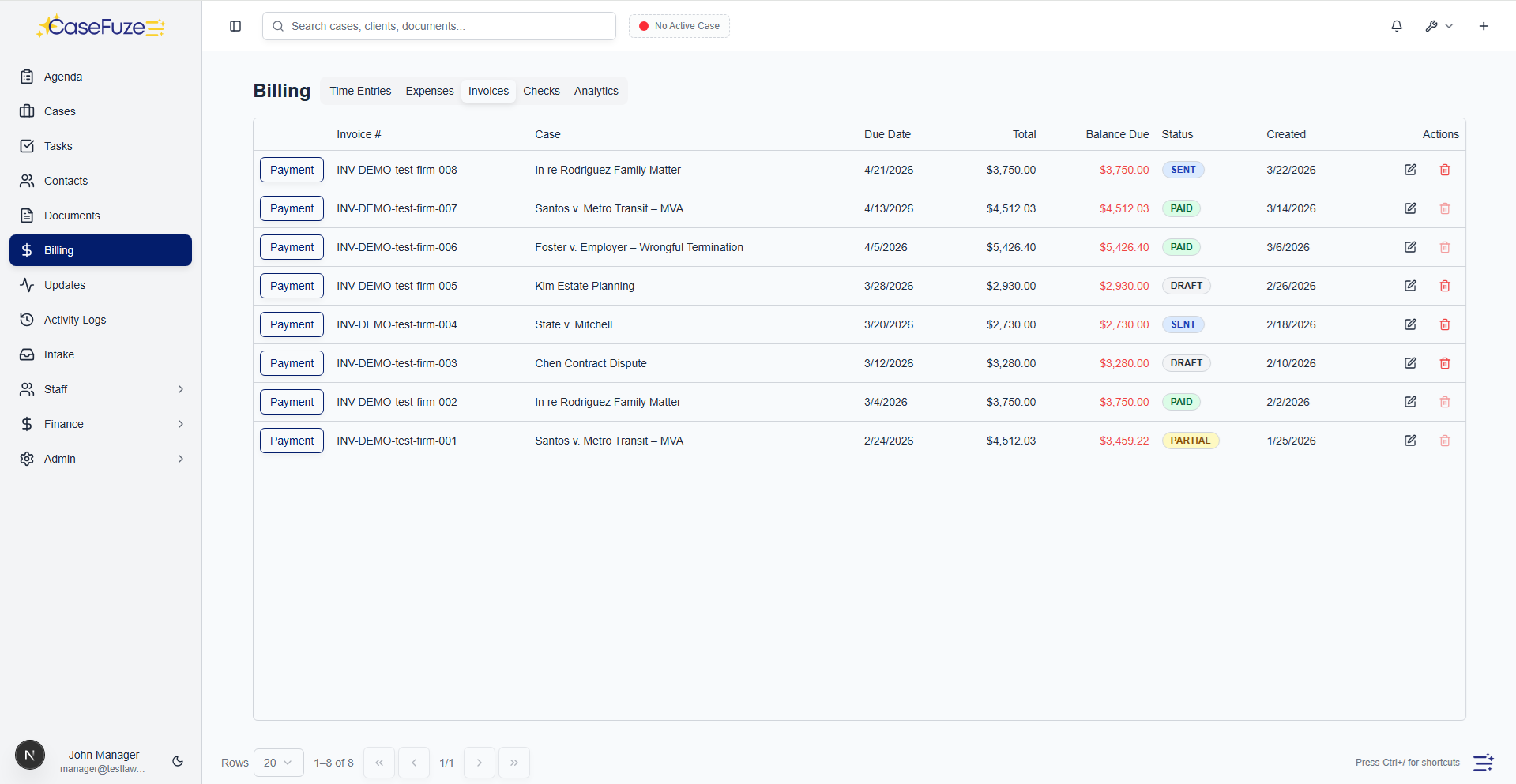
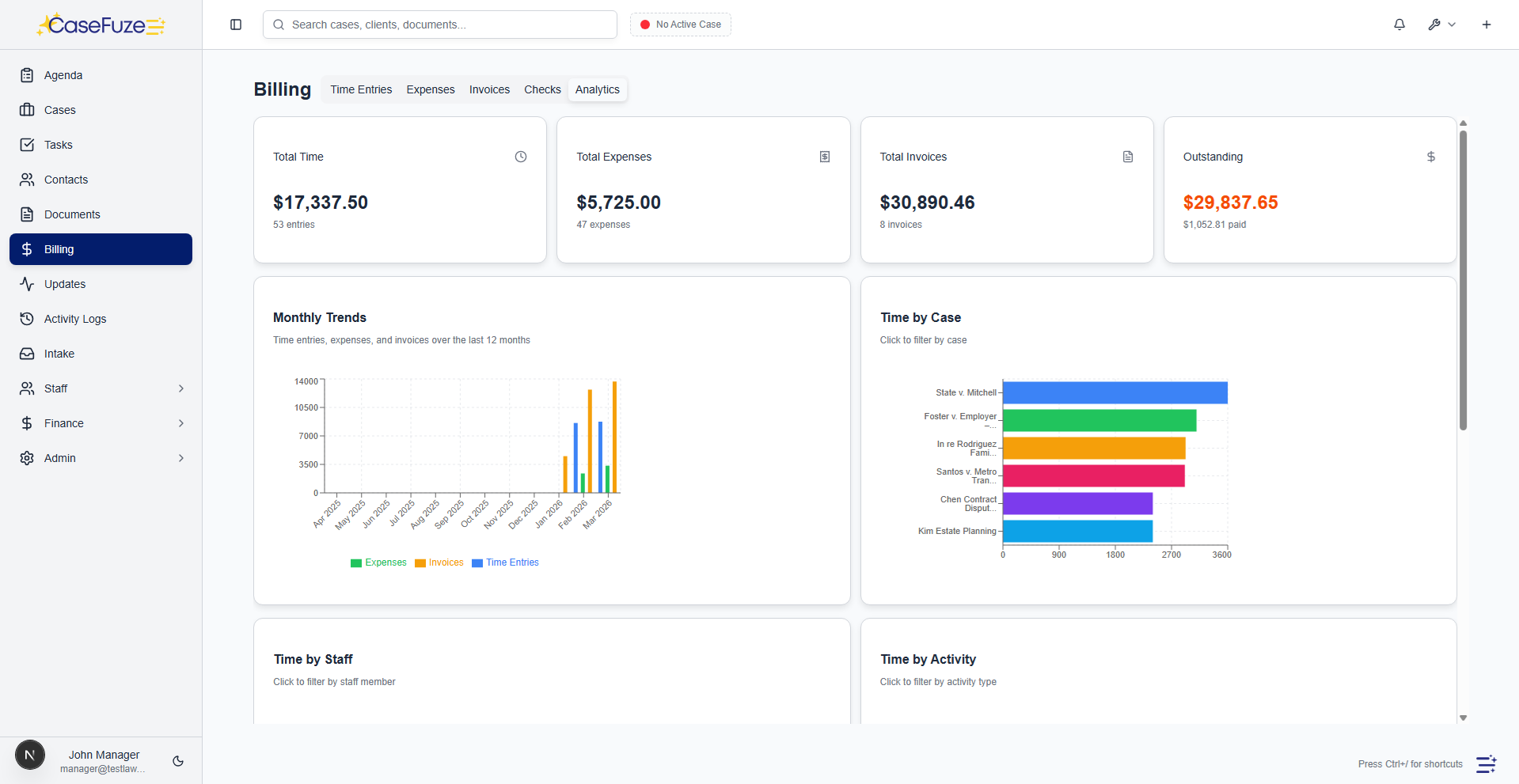
CaseFuze billing dashboard overview

Create invoices without rebuilding everything by hand.

CaseFuze keeps time, expenses, trust balances, and matter details connected so billing is faster and easier to review.

  • Auto-build invoices - rom tracked work instead of retyping entries at month end.
  • Support different billing models - or hourly, flat-fee, retainer, contingency, and split-bill matters.
  • Keep trust and billing together - o your team can see the full financial picture in one screen.

Time Tracking Integration

Billing starts with time tracking. If you’re not tracking time accurately, you’re leaving money on the table.

CaseFuze’s time tracking integrates directly with billing. When you track time on a case, those entries automatically populate when you generate an invoice. No manual transfer. No spreadsheet exports. No data entry mistakes.

Time entries include descriptions, so invoices show clients exactly what work you performed. “Research motion to compel law” is more defensible than “legal research” when clients question bills.

You can edit time entries before invoicing. Combine similar entries. Rewrite descriptions for clarity. Adjust amounts for write-downs or client agreements. Every change is tracked with audit trails showing original time and final billed amounts.

Expense Tracking and Reimbursement

Court filing fees, expert witness fees, copying costs, travel expenses. Cases generate expenses that clients should reimburse.

CaseFuze tracks expenses by case. Add an expense, attach the receipt, mark it as billable or non-billable, and it appears on the next invoice automatically. Clients see exactly what expenses they’re being charged and can request receipts if needed.

This also works for internal accounting. Track which expenses are billable versus firm overhead. Generate reports showing total expenses by case, client, or practice area. See which cases are profitable after expenses get factored in.

Payment Processing Getting invoices sent is half the battle. Getting them paid is the other half.

CaseFuze includes integrated payment processing so clients can pay invoices directly online. They receive the invoice with a “Pay Now” button, click it, enter payment information, and the payment processes immediately.

This is where CaseFuze’s own payment processing makes a huge difference. Because we operate our own payment infrastructure instead of using third-party processors, our transaction fees are significantly lower than competitors. Law firms using other software often pay 3-4% in processing fees. CaseFuze’s fees are substantially less, which means you keep more of what clients pay.

Payment features:

  • Accept credit cards, debit cards, and ACH transfers
  • Automated payment receipts sent to clients
  • Partial payment options for large invoices
  • Recurring billing for retainers or subscriptions
  • Payment plans with automated installments


Payments automatically apply to the correct invoice and update client balances in real time. Your bookkeeper doesn’t need to manually reconcile payments. Everything syncs automatically.

Trust Accounting Integration

Many clients pay retainers into trust accounts before work begins. As you perform work, you transfer earned fees from trust to operating.

CaseFuze connects billing directly to trust accounting. When you generate an invoice, the system checks whether the client has trust funds available. Apply trust funds to the invoice with one click, and CaseFuze handles the transfer automatically.

The trust account ledger updates. The operating account records the deposit. The invoice marks as paid. All three happen simultaneously with complete audit trails.

This eliminates the manual process of generating invoices, calculating what can be paid from trust, making transfers, and updating records in multiple systems. One click handles everything.

Invoice Customization Your invoices represent your firm. They should look professional and match your brand.

CaseFuze’s invoice templates are fully customizable. Add your logo, adjust colors to match your branding, modify layouts, and include custom footer text. Choose which details to show or hide. Format time entries as detailed lists or summary totals.

Create multiple templates for different clients or practice areas. High-volume personal injury cases might get simplified invoices. Corporate clients might want detailed breakdowns showing every six-minute increment. Government contracts might require specific formatting to meet procurement rules.

Once you’ve designed templates, generating invoices uses the appropriate template automatically based on client or matter type.

Automated Payment Reminders

Clients forget to pay invoices. Sometimes they’re busy, sometimes they’re avoiding the bill, sometimes the invoice went to spam.

CaseFuze sends automated payment reminders on schedules you define. First reminder seven days after the due date. Second reminder at 14 days. Final notice at 30 days. Each reminder includes the original invoice, current balance, and easy payment options.

You can customize reminder language, adjust timing, and exclude specific clients from automated reminders. The system tracks which reminders were sent when, so you know exactly what communication each client received.

This automation means you don’t need staff manually tracking down late payments. The system handles routine follow-up automatically, and you only get involved when clients need special attention.

Reporting That Shows Firm Health

Billing generates data. How much did you bill last month? Which clients owe money? What’s your realization rate? How long does it take to collect payment?

CaseFuze’s billing reports answer these questions without Excel exports.

Available reports:

  • Revenue reports showing billed amounts by attorney, practice area, or time period
  • Accounts receivable aging showing who owes what and for how long
  • Realization reports comparing time tracked to time billed to time collected
  • Payment history showing when clients paid and what methods they used
  • Write-off analysis showing which matters or clients have the most adjustments


Schedule reports to run automatically. Daily AR aging goes to your bookkeeper. Monthly revenue reports go to partners. Quarterly realization analysis goes to your management team.

These reports help you spot problems early. If realization rates are dropping, you’re writing off too much time. If collection periods are lengthening, clients are paying slower. If certain practice areas show higher write-offs, pricing might be wrong.

Split Billing and Allocation

Some cases involve multiple responsible parties. Divorces might split fees between spouses. Corporate matters might allocate costs across divisions. Government contracts might require specific billing allocation.

CaseFuze handles split billing directly. Designate multiple payors on a case and specify how costs split between them. Generate separate invoices for each party showing their portion of fees. Or generate one invoice with clear allocation showing which party owes what.

This also works for internal allocation. Track which department, office, or partner should receive credit for revenue. Generate internal reports showing performance by business unit while clients receive single consolidated invoices.

Client Portal Access

Clients want visibility into what they’re being charged for and what they owe.

CaseFuze’s client portal shows clients their current balance, invoice history, and payment options. They can view detailed invoices showing exactly what work was performed. They can download invoices for their records. They can make payments directly without calling your office.

This transparency reduces billing disputes. Clients who can see their invoices and track their payments are less likely to question charges. They understand what they’re paying for because the information is always accessible.

When clients do have questions, your staff can log into the same portal view and see exactly what the client sees. No confusion about which invoice or which payment is in question.

Works With Your Accounting Software

Most firms use QuickBooks, Xero, or similar accounting software for firm-wide financial management. Your case management billing needs to sync with your general ledger.

CaseFuze exports billing data in formats these systems can import. Generate your invoices in CaseFuze, then export to your accounting software for financial reporting and tax preparation.

This integration keeps your books accurate without double-entry. Bill clients in CaseFuze, record revenue in your accounting software, and everything reconciles automatically.

Pricing Billing and invoicing are included in CaseFuze’s standard $49 per user, per month pricing. No per-invoice fees. No charges for payment processing beyond the actual transaction fees (which are significantly lower than competitors).

Most firms increase revenue by billing more accurately, collecting faster, and reducing write-offs. When clients can pay invoices with one click and automated reminders keep payments on schedule, your cash flow improves substantially.

Flexible payment plans

Offer payment plans to clients without spreadsheet tracking. CaseFuze manages schedules, tracks payments, and sends reminders.

  • Payment plan setup - Set initial payment amount and due date, then configure installment amount and frequency (weekly, biweekly, monthly).
  • Automatic schedule generation - CaseFuze generates the full payment schedule with due dates and amounts for each installment.
  • Payment tracking - Link payments to scheduled installments. See which installments are paid, pending, or overdue.
  • Automatic reminders - Send automatic email reminders to clients before installment due dates.
  • Schedule adjustments - Adjust payment amounts or dates if client circumstances change. CaseFuze recalculates the schedule.
  • Payment plan status - See all active payment plans, total outstanding, and upcoming installments in one dashboard.

Online payments and fast collections

Accept credit cards, debit cards, and ACH payments online. Get paid in days instead of weeks.

  • Secure online payments - Clients pay invoices online via credit card, debit card, or bank transfer (ACH).
  • Pay-by-link - Include a “Pay Now” link in invoice emails. Clients click and pay in seconds.
  • Client portal payments - Clients log into the portal, view outstanding invoices, and pay with one click.
  • Recurring payments - Set up recurring payments for payment plans. Clients authorize automatic charges on due dates.
  • Payment notifications - Receive instant notifications when clients pay. Payments automatically apply to invoices and update ledgers.
  • Payment history - Full payment history per case and per client. See payment date, amount, method, and linked invoice.
  • Retainer tracking - Track retainer balances by case. Deduct time and expenses from retainers and see remaining balance in real time.

Billing analytics and reporting

Know your firm’s financial health in real time. Track unbilled time, realization rates, and collections by attorney, practice area, and case type.

  • Unbilled time reports - See total unbilled time by case, attorney, or firm-wide. Spot cases with high unbilled time that need invoicing.
  • Realization rates - Track percentage of time entries that convert to invoiced and paid amounts. Identify write-offs and discounts.
  • Outstanding invoices - See all unpaid invoices with aging buckets (0-30 days, 31-60 days, 61-90 days, 90+ days).
  • Collection reports - Track payments received by week, month, or quarter. Compare to invoiced amounts to measure collection rate.
  • Attorney productivity - See billable hours, invoiced amounts, and collected amounts by attorney. Identify top billers.
  • Case profitability - Track time, expenses, and revenue per case. See which cases are profitable and which are underwater.
  • Revenue forecasting - Project future revenue based on unbilled time, outstanding invoices, and historical collection rates.

Simple & Transparent Pricing

CaseFuze keeps pricing straightforward - $49 per user, per month with every feature included. No tiers, no hidden add-ons, and no confusing upgrade paths. From legal case management software essentials like matters, billing, and trust accounting to advanced tools for HR, reporting, and automation, you get it all in one plan. As your firm grows, simply add users and scale without worrying about extra costs.

All in One

$49/ User / Month

Flat-rate pricing that covers your entire firm. No tiers. No hidden costs. No add-ons.

Includes:

Why CaseFuze Pricing Works for Every Firm

CaseFuze is designed to remove complexity not only from practice management but also from how you pay for it. With one flat rate of $49 per user, per month, you get unlimited access to the complete platform: matters, billing, IOLTA trust accounting, HR operations, documents, and mobile apps, all included from day one. There are no confusing tiers, hidden add-ons, or upgrade traps. This keeps costs predictable and allows your team to focus on serving clients instead of managing multiple subscriptions.

Our pricing model also scales naturally as your firm grows. Whether you're a solo attorney adding your first assistant or a small team expanding into multiple practice areas, every new user joins the same flat-rate plan with full access to all features. That means you don't lose functionality as you grow, and you never have to pay extra just to unlock core tools. CaseFuze makes it easy to budget with confidence, knowing that everything you need is already included.

All-in-One Access

One plan includes case management, billing, documents, trust accounting, and HR tools.

Scales With Your Firm

Add new users seamlessly while keeping the same predictable plan.

No Hidden Costs

Transparent pricing ensures your software budget is stable and reliable.