
Reporting and Analytics That Actually Tell You What's Happening

Running a law firm on gut feelings and anecdotes doesn’t work. You need real data about what’s happening, where problems are developing, and which decisions actually improve performance. CaseFuze’s reporting gives you that visibility without requiring you to become a data analyst.

Dashboards That Show What Matters

Most legal software buries important metrics across multiple screens and reports. By the time you find the information you need, you’ve forgotten why you were looking for it.

CaseFuze’s dashboard puts your firm’s health on one screen. Open case counts, upcoming deadlines, revenue trends, trust account balances, and team productivity all visible immediately. No digging through menus or running custom queries.

The dashboard updates in real time. When someone logs time, the productivity metrics update. When a payment processes, revenue numbers adjust. When a deadline approaches, it moves up the priority list. You’re always looking at current information, not yesterday’s snapshot.

Customizable Views

Different people need different information. Managing partners want firm-wide financial metrics. Practice area leaders need caseload data for their teams. Individual attorneys want their personal productivity and billing statistics.

CaseFuze lets everyone customize their dashboard. Add the widgets you use daily, remove ones you don’t care about, arrange them in the order that makes sense for your workflow.

These customizations save across devices. Your desktop dashboard, tablet view, and mobile app all show the same layout you’ve configured.

How CaseFuze Simplifies Reporting and Analytics That Actually Tell You What's Happening

Reporting and Analytics That Actually Tell You What's Happening

Running a law firm on gut feelings and anecdotes doesn't work. You need real data about what's happening, where problems are developing, and which decisions actually improve performance. CaseFuze's reporting gives you that visibility without requiring you to become a data analyst.
Financial Reporting

Financial Reporting

Law firm finances involve more complexity than most businesses.

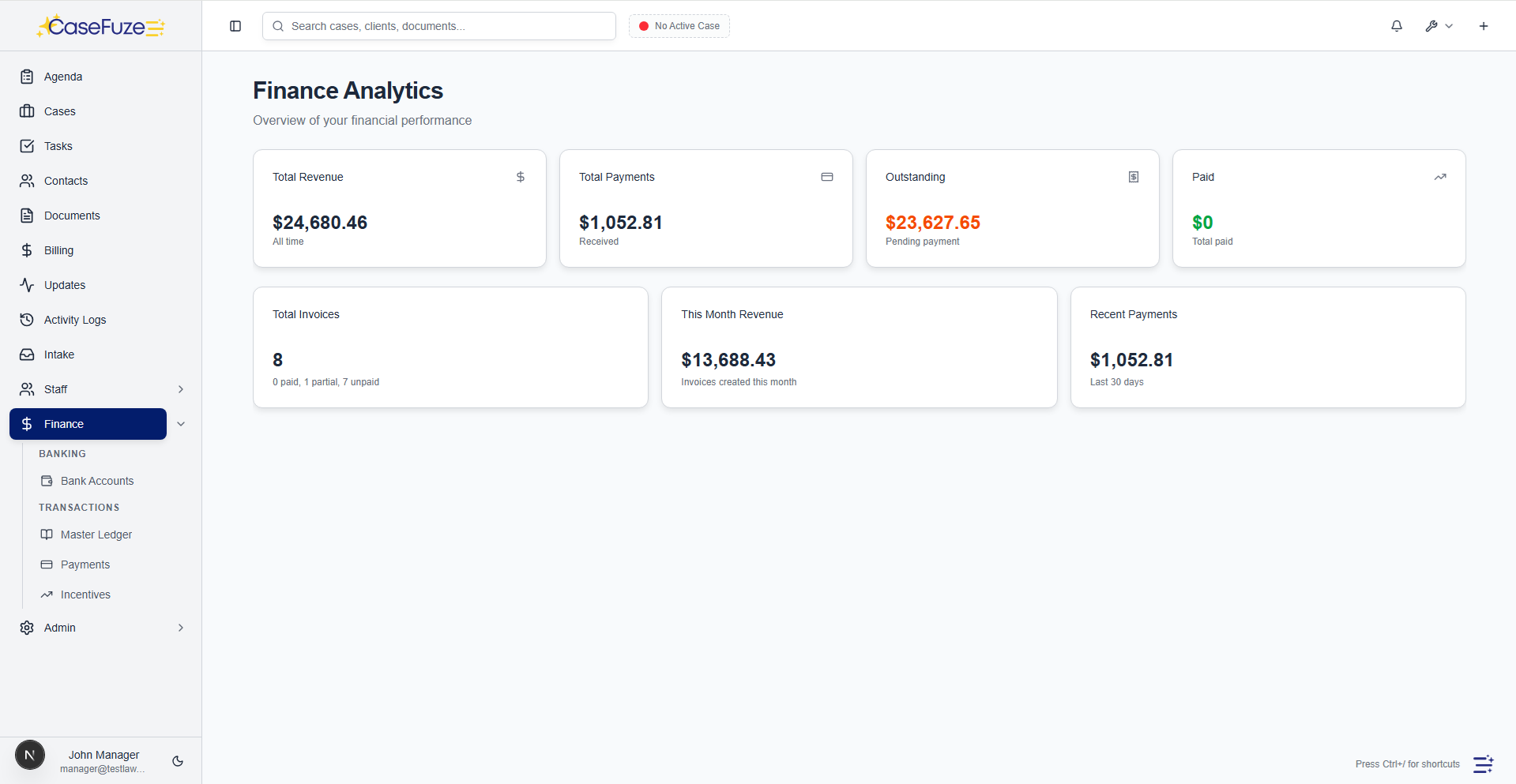
  • CaseFuze's financial reports cover everything you need:
  • Revenue reports show billed amounts by attorney, practice area, client, or time period.
  • See who's generating revenue and which areas drive firm growth.
Financial Reporting

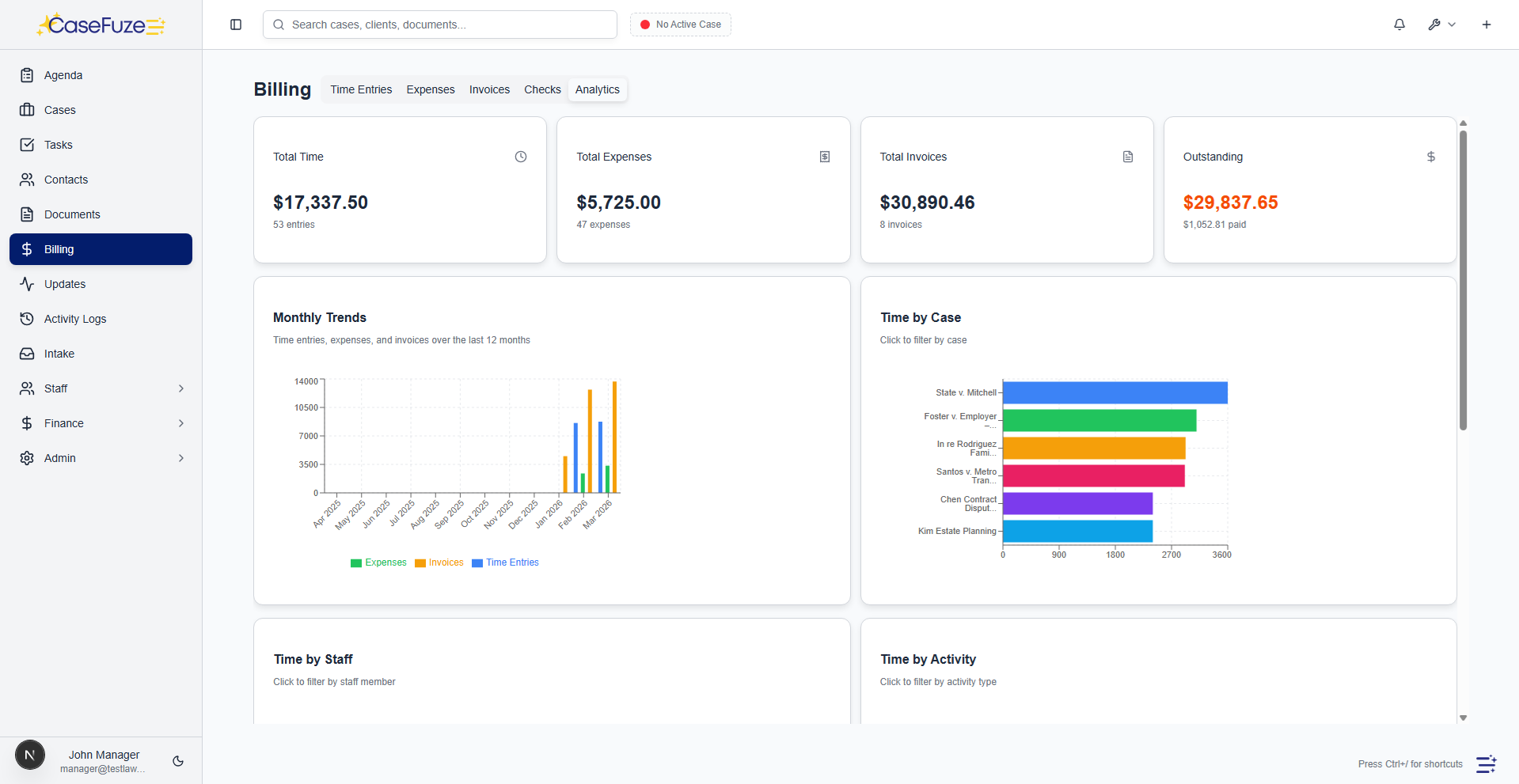
Law firm finances involve more complexity than most businesses. Trust accounts, operating accounts, accounts receivable, work in progress, realization rates, collection rates. Understanding firm profitability requires tracking all of these simultaneously.

CaseFuze’s financial reports cover everything you need:

Revenue reports show billed amounts by attorney, practice area, client, or time period. See who’s generating revenue and which areas drive firm growth. Compare current periods to historical data to identify trends.

Accounts receivable aging shows who owes what and for how long. Aging buckets (current, 30 days, 60 days, 90+ days) highlight collection problems before they become write-offs. See which clients are slow payers and which invoices need follow-up.

Work in progress tracks time and expenses that have been incurred but not yet billed. High WIP means you’re doing work without generating invoices, which hurts cash flow. Monitor WIP to ensure timely billing.

Realization reports compare time worked to time billed to time collected. Low realization indicates inefficiency, excessive write-offs, or collection problems. Track realization by attorney, practice area, and client to identify where improvements are needed.

Trust account reports show balances, transactions, and three-way reconciliation status. See which clients have trust funds available, identify inactive balances that should be addressed, and verify compliance with bar requirements.

Profitability Analysis

Not all revenue is equally profitable. Some practice areas have high overhead. Some clients demand constant attention for minimal fees. Some matters drag on unprofitably for months.

CaseFuze’s profitability reports show which work actually makes money:

  • Matter profitability comparing time invested to fees collected
  • Client profitability showing lifetime value after accounting for write-offs and collection issues
  • Practice area profitability considering attorney rates, realization, and overhead
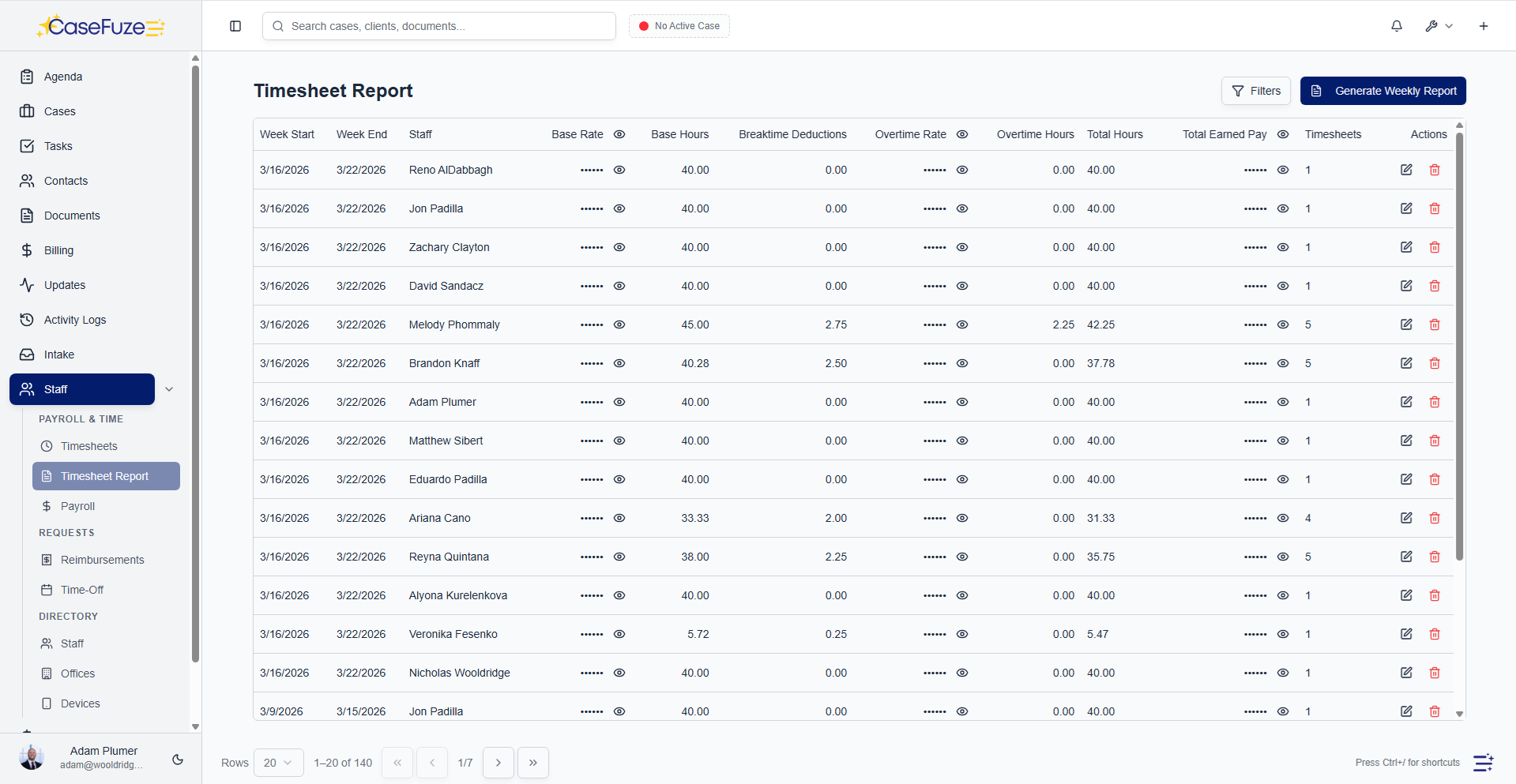
  • Originating attorney analysis showing who brings in the most profitable work

These insights drive strategic decisions. Should you grow your family law practice or focus on personal injury? Which clients should you pursue more of? Which attorneys deserve bonuses for bringing in profitable work?

Productivity Metrics

Understanding how your team spends time helps you identify inefficiencies and allocate resources appropriately.

Billable hours tracking shows how much time each person bills over any period. Compare to targets to see who’s meeting expectations and who needs support or training.

Utilization rates measure billable time as a percentage of total available time. If someone’s in the office 40 hours per week but only billing 20, they’re underutilized. High utilization might indicate overwork and burnout risk.
Task completion rates show how quickly work gets done and where bottlenecks exist. If discovery responses consistently take three weeks when they should take one, you’ve identified a problem area.

Case lifecycle analysis tracks average time from intake to resolution by practice area and case type. Shorter lifecycles generally mean more efficient processes and better client service.

These metrics help you staff appropriately, identify training needs, and improve processes systematically.

Caseload Management

Overloaded attorneys make mistakes and burn out. Underutilized attorneys waste resources. Balanced caseloads keep everyone productive without overwhelming anyone.

CaseFuze’s caseload reports show:

  • Open cases by attorney with status breakdowns
  • New case assignments over time to track workload trends
  • Case closure rates showing who’s resolving matters efficiently
  • Average caseload by attorney, practice area, or office

Use this data to balance work distribution. If one attorney has 40 open cases while another has 10, maybe assignments need adjustment. If case closures are declining, maybe workloads are too high or processes need improvement.

Practice Area Performance

Most firms handle multiple practice areas. Each area has different economics, workflows, and performance metrics.

CaseFuze breaks down performance by practice area:

  • Revenue contribution showing which areas generate the most income
  • Profitability comparison after accounting for different cost structures
  • Realization rates by area identifying where time is getting written off
  • Average case value and lifecycle by area
  • Growth trends showing which areas are expanding or contracting


This visibility helps with strategic planning. Should you hire another personal injury attorney or invest in growing your corporate practice? Which areas are profitable enough to market aggressively? Where should you reduce capacity?

Client Analytics

Some clients are great. They pay promptly, provide engaging work, and refer others. Other clients are nightmares. They dispute bills, demand excessive attention, and create stress for your team.

CaseFuze’s client reports help you identify both:

Best clients with high lifetime value, prompt payment, and good referrals deserve attention and cultivation. These relationships should be protected and grown.

Problematic clients with low realization, slow payment, or excessive demands might not be worth keeping. Sometimes firing bad clients improves firm profitability and morale.

Client acquisition cost tracking shows how much marketing spend is required to acquire new clients by source and practice area. Compare acquisition costs to lifetime value to determine ROI on marketing investments.

Lead Conversion Analytics

Understanding intake and conversion metrics helps you optimize marketing spend and improve sales processes.

Lead source performance shows which channels generate the most leads, highest conversion rates, and best client quality. If organic search generates better clients than paid ads, adjust your marketing accordingly.

Conversion funnel analysis tracks leads through stages: initial contact, qualification, consultation, retention. See where leads drop off and identify bottlenecks in your intake process.

Response time impact measures how quickly your team follows up with leads and correlates that with conversion rates. Faster response almost always improves conversions.

Consultation show rates and conversion rates help you understand calendar efficiency. If people aren’t showing up for scheduled consultations, your confirmation process needs work. If show rates are good but conversion is low, the problem might be consultation quality or pricing.

Marketing ROI

Marketing budgets should generate returns. CaseFuze tracks the full cycle from marketing expense through lead generation to retained clients to collected revenue.

See which marketing channels produce actual revenue, not just leads. A channel that generates 100 leads but only 2 clients isn’t as valuable as a channel generating 20 leads with 8 clients. Quality matters more than quantity.

Calculate cost per acquisition by channel. If Google Ads cost $500 per retained client while referral programs cost $50 per client, the better investment is obvious.

This data-driven approach to marketing eliminates waste and focuses resources on what actually works.

Operational Reports Beyond financial and productivity metrics, firms need operational data about how work flows through the organization.

Deadline tracking shows upcoming court dates, filing deadlines, and statute of limitations across all cases. See everything on the horizon to prevent surprises and missed deadlines.

Document management statistics show storage usage, document types, and filing patterns. Identify cases with missing documents or practices that need better organization.

Communication tracking measures client contact frequency, response times, and satisfaction levels. Ensure clients are getting appropriate attention without overwhelming them.

Staff performance metrics show how different roles contribute. Paralegals completing more tasks might need administrative support. Assistants handling high volumes of intake might deserve recognition or raises.

Custom Report Builder

Pre-built reports cover common needs, but every firm has unique questions. CaseFuze’s report builder lets you create custom reports using any data in your system.

Select the fields you want to analyze, set filters to narrow results, choose grouping and sorting options, and generate reports showing exactly what you need to know. Save these custom reports for future use or schedule them to run automatically on specific intervals.

This flexibility means you’re never stuck waiting for software updates to add the report you need. If you want to see something, you can build it yourself.

Scheduled Report Delivery

Important reports shouldn’t require someone to remember to generate them. CaseFuze schedules reports to run automatically and email to relevant people.

Daily cash receipt reports go to bookkeepers. Weekly caseload summaries go to practice group leaders. Monthly financial packages go to managing partners. Quarterly performance reviews go to all attorneys.

Everyone gets the information they need without requesting it, and reports arrive consistently without depending on anyone’s memory.

Export and Integration

While CaseFuze’s built-in reports handle most needs, sometimes you need data in other formats for specialized analysis or presentation.

Export any report to Excel, PDF, or CSV formats. Build presentations using exported data. Perform complex calculations in Excel. Share PDFs with partners who don’t use the system regularly.

For firms using separate accounting software, CaseFuze exports financial data in formats QuickBooks, Xero, and other systems can import. Keep your general ledger synchronized without duplicate data entry.

Visual Data Presentation

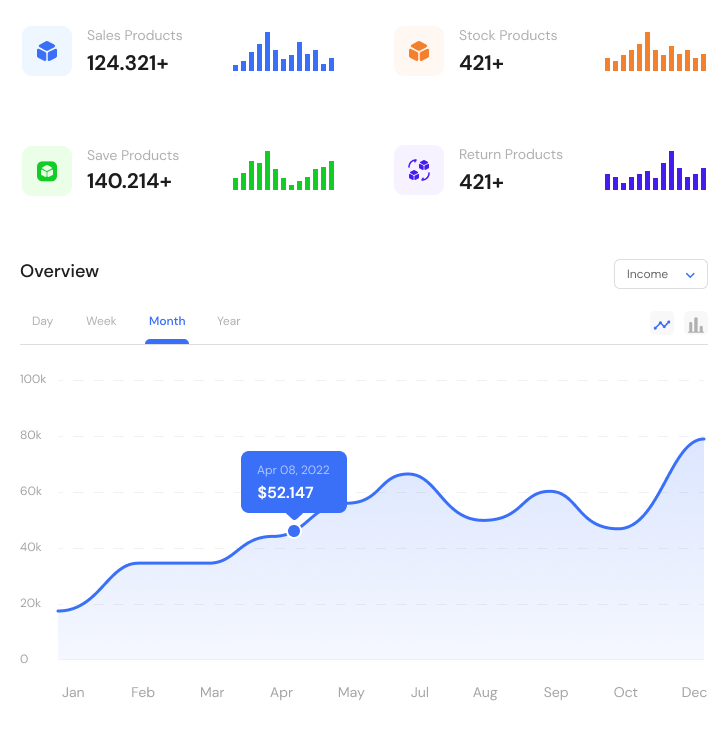
Numbers in tables are useful, but visual presentation often communicates more effectively. CaseFuze includes charts and graphs for all major metrics:

  • Revenue trend lines showing growth or decline over time
  • Bar charts comparing performance across attorneys or practice areas
  • Pie charts showing revenue distribution by client or practice area
  • Funnel visualizations for conversion and sales pipeline analysis
  • Heat maps showing activity patterns and busy periods


These visualizations make patterns obvious. A declining trend line immediately signals problems that might be hidden in tables of numbers. Visual reports work well for presentations to partners or client pitches showing firm capabilities.

Mobile Reporting

Important metrics shouldn’t require being at your desk. CaseFuze’s mobile app includes key reports and dashboards.

Check cash receipts while traveling. Review caseload status before meetings. Monitor trust account balances from anywhere. See productivity metrics while working from home.

Mobile reports are simplified for phone screens but include all essential information. Tap through for details when you need more context.

Benchmarking Understanding your firm’s performance in isolation is helpful. Understanding how you compare to similar firms is more valuable.

CaseFuze provides anonymized benchmarking data showing how your metrics compare to firms of similar size, practice area mix, and geographic location. See if your realization rates, utilization, or collection speeds are industry-standard or if improvement is needed.

This external perspective prevents complacency. You might think 65% realization is fine until you learn that comparable firms average 78%. You might worry about 85% utilization when industry standard is 90%.

Benchmarking provides context for setting goals and evaluating performance realistically.

Pricing Reporting and analytics are included in CaseFuze’s standard $49 per user, per month pricing. All reports. Custom report builder. Scheduled delivery. Unlimited exports.

Most firms increase profitability by 10-20% just by making decisions based on data instead of guesswork. When you know which clients are profitable, which practice areas need attention, and where inefficiencies exist, improvement becomes systematic instead of random.

Simple & Transparent Pricing

CaseFuze keeps pricing straightforward'$49 per user, per month with every feature included. No tiers, no hidden add-ons, and no confusing upgrade paths. From legal case management software essentials like matters, billing, and trust accounting to advanced tools for HR, reporting, and automation, you get it all in one plan. As your firm grows, simply add users and scale without worrying about extra costs.

All in One

$49/ User / Month

Flat-rate pricing that covers your entire firm. No tiers. No hidden costs. No add-ons.

Includes:

Why CaseFuze Pricing Works for Every Firm

CaseFuze is designed to remove complexity not only from practice management but also from how you pay for it. With one flat rate of $49 per user, per month, you get unlimited access to the complete platform, matters, billing, IOLTA trust accounting, HR operations, documents, and mobile apps, all included from day one. There are no confusing tiers, hidden add-ons, or upgrade traps. This keeps costs predictable and allows your team to focus on serving clients instead of managing multiple subscriptions.

Our pricing model also scales naturally as your firm grows. Whether you're a solo attorney adding your first assistant or a small team expanding into multiple practice areas, every new user joins the same flat-rate plan with full access to all features. That means you don't lose functionality as you grow, and you never have to pay extra just to unlock core tools. CaseFuze makes it easy to budget with confidence, knowing that everything you need is already included.

All-in-One Access

One plan includes case management, billing, documents, trust accounting, and HR tools.

Scales With Your Firm

Add new users seamlessly while keeping the same predictable plan.

No Hidden Costs

Transparent pricing ensures your software budget is stable and reliable.